Introduction to Presentation Software (PowerPoint)
20 views
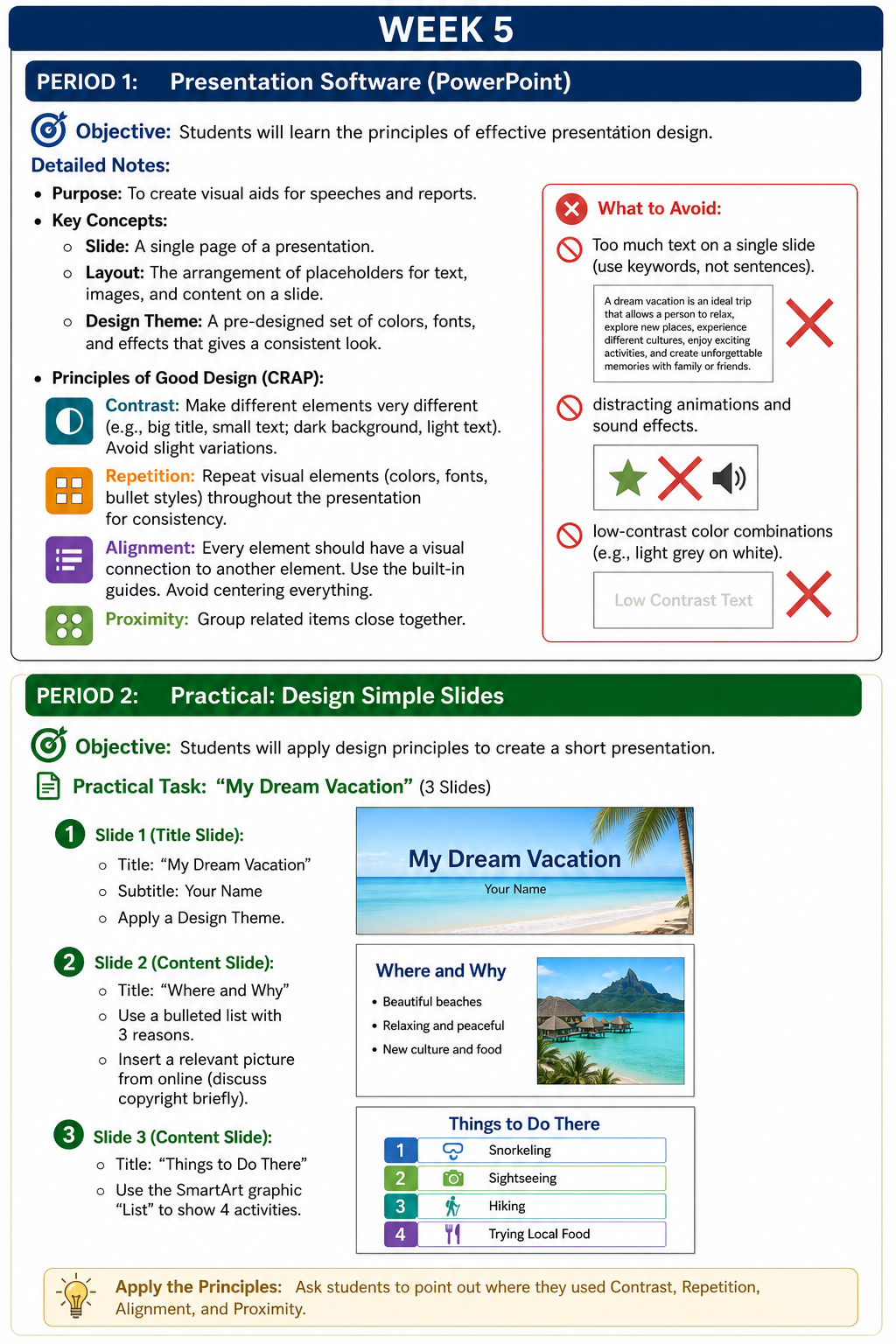
Week 5
Period 1: Introduction to Presentation Software (PowerPoint)
Objective: Students will understand the basic features of presentation software and learn the principles of effective slide design.
Lesson Notes
Purpose of Presentation Software
Presentation software, such as Microsoft PowerPoint, is used to create visual supports for speeches, class reports, and other presentations. It helps present information in a clear, organized, and engaging way.
Key Terms
- Slide: One page or screen in a presentation.
- Layout: The arrangement of text boxes, images, titles, and other content on a slide.
- Design Theme: A ready-made combination of colors, fonts, backgrounds, and effects that gives all slides a consistent appearance.
Principles of Effective Slide Design
Introduce students to the CRAP design principles:
- Contrast: Make important elements stand out clearly. For example, use large titles, smaller body text, and strong differences between background and font colors. Avoid small differences that are hard to notice.
- Repetition: Use the same fonts, colors, and styles across slides to create a neat and professional look.
- Alignment: Place items neatly so that each element appears connected to others on the slide. Use PowerPoint guides to help with positioning. Avoid centering everything unless necessary.
- Proximity: Keep related items close together so the audience can easily understand the connection between them.
Common Mistakes to Avoid
- Putting too much text on one slide; use key words or short phrases instead of full sentences.
- Using distracting animations, transitions, or sound effects.
- Choosing colors with poor contrast, such as light text on a light background.
Period 2: Practical Activity – Creating Simple Slides
Objective: Students will apply presentation design principles by creating a short slideshow.
Practical Task: “My Dream Vacation”
Students will create a 3-slide presentation.
Slide 1: Title Slide
- Title: My Dream Vacation
- Subtitle: Student’s Name
- Apply a suitable Design Theme
Slide 2: Content Slide
- Title: Where and Why
- Add a bulleted list with 3 reasons for choosing the destination
- Insert a relevant image from an online source
- Briefly discuss the importance of using images responsibly and respecting copyright
Slide 3: Content Slide
- Title: Things to Do There
- Use a SmartArt List to present 4 activities available at the destination
Design Check
After completing the presentation, students should identify how they used the four design principles:
- Contrast
- Repetition
- Alignment
- Proximity
Test yourself on Digital Technology
Introduction to Sequencing, Loops, and Simple Animation in Scratch
134 questions
10 min
SSS1
Start quiz
Track your reading & take quizzes
Create free account