Motherboard and Chipset Basics
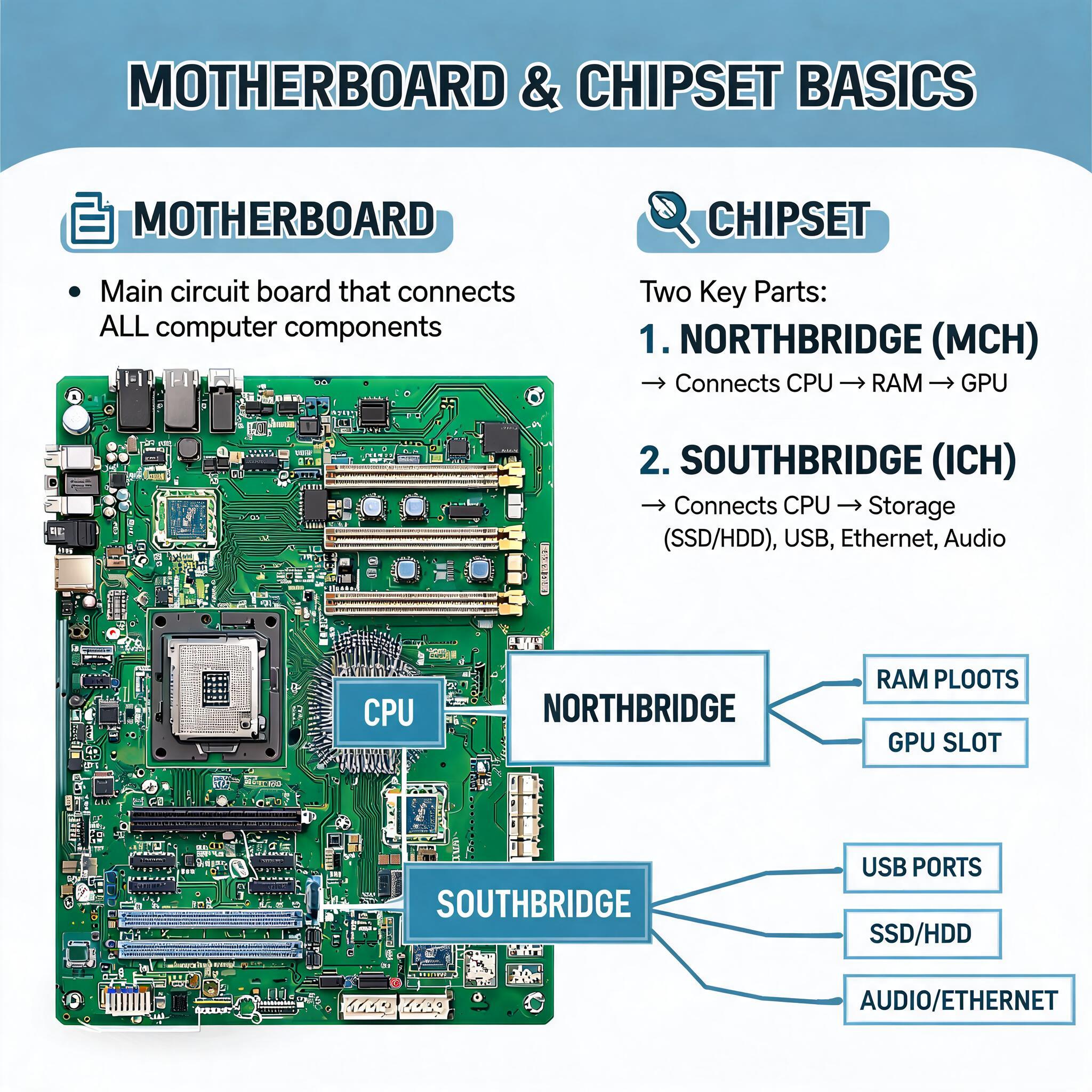
📅 Week 5: The Backbone of Computing – Motherboard & Chipset Mastery
1. The Motherboard (Mainboard)
🧠 Definition & Role
The motherboard is the central nervous system of the computer. It is the primary Printed Circuit Board (PCB) that physically houses the CPU and provides the electrical pathways and communication protocols for all hardware components to interact. It dictates system compatibility, expandability, and feature sets.
💡 Modern Update: Motherboards now include integrated Wi-Fi/Bluetooth modules, advanced RGB/ARGB controller hubs, and TPM 2.0 security chips (required for modern OS security like Windows 11).
🖼️ AI Illustration Idea: The Annotated Motherboard
Usage: Use this prompt to generate a clear, labeled overview image for students.
Hyper-realistic isometric 3D render of a modern ATX motherboard, floating components slightly separated for clarity, glowing data lines connecting CPU to RAM and GPU slots, clean tech-education style, white background, 8k resolution, detailed circuitry textures --ar 16:9🔑 Key Components (Updated & Expanded)
🔹 CPU Socket
- Function: The interface that physically and electrically connects the Processor to the motherboard.
- Modern Standards:
- LGA (Land Grid Array): Pads are on the motherboard, pins on the CPU. Used by Intel (e.g., LGA 1700, LGA 1851) and modern AMD AM5.
- PGA (Pin Grid Array): Pins are on the CPU (largely legacy, used in older AM4).
- ⚠️ Compatibility Warning: Sockets are generation-locked. A newer CPU will not fit an older socket without a different motherboard.
🔹 Memory Slots (DIMM)
- Function: Hosts the system's volatile memory.
- Modern Standards:
- DDR5: The current standard. Offers higher speeds, better efficiency, and dual-channel architecture per stick compared to DDR4.
- Configuration: Most modern boards feature 4 slots for maximum capacity, though high-end boards are shifting to 2-slot DDR5 designs to improve signal integrity.
🔹 Expansion Slots (PCIe)
- Function: Allows addition of peripherals like GPUs, NVMe adapters, and capture cards.
- Modern Standards:
- PCIe 5.0: Now available on high-end boards, offering double the bandwidth of PCIe 4.0, primarily for next-gen GPUs and ultra-fast storage.
- Lane Distribution: Slots share bandwidth. Using an M.2 slot may reduce the speed of a secondary PCIe slot; this depends on the chipset and CPU.
🔹 Storage Connectors
- M.2 Slots (NVMe):
- Update: The dominant storage form factor. Connects directly to the motherboard via PCIe lanes (NVMe protocol). Offers speeds up to 7,000–14,000 MB/s on PCIe 5.0 drives.
- Key Types: M-Key (NVMe SSDs).
- SATA III:
- Legacy Support: Used for 2.5" SSDs and mechanical HDDs. Capped at 600 MB/s. Essential for mass storage and legacy systems.
🔹 Power Connectors
- 24-Pin ATX: Main power delivery from the PSU to the board.
- 🆕 CPU Power (EPS):
- 8-Pin (4+4) or 8+8 Pin: Dedicated high-current power for the CPU. Never use the PCIe GPU power connector here; it can cause damage.
- 🆕 Front Panel Power Connectors: For Case Buttons and Power LED indicators.
🔹 Voltage Regulator Module (VRM)
- 🆕 Critical Addition: Located near the CPU socket. The VRM steps down the PSU's 12V to the precise voltages the CPU and RAM need (e.g., 1.2V).
- Quality Matters: High-quality motherboards have more power phases and larger VRM heatsinks to prevent throttling during overclocking or heavy loads.
🔹 I/O Panel (Rear Connectors)
- Updates:
- USB-C/USB4: High-speed data and video output.
- 2.5Gb Ethernet: Standard on mid-range boards; 10GbE on high-end.
- DisplayPorts/HDMI: For integrated graphics output.
- Wi-Fi Antenna Headers: Gold-plated connectors for wireless antennas.
🖼️ AI Illustration Idea: VRM & Power Detail
Usage: Helps students understand power delivery complexity.
Macro close-up photography of a motherboard VRM section, copper heatpipes, stacked capacitors, and thermal pads, dramatic lighting highlighting metal textures, educational hardware focus --ar 4:32. The Chipset
🎛️ Definition & Role
The chipset is the motherboard's Traffic Controller. It is a set of integrated circuits that manage data flow between the CPU, memory, storage, and peripherals. It determines the "featureset" of the motherboard, including overclocking support, number of USB ports, and storage limits.
📜 Evolution: From Bridge to PCH
- Legacy Architecture (Northbridge/Southbridge):
- Northbridge: Handled high-speed data (CPU ↔ RAM ↔ GPU).
- Southbridge: Handled slower I/O (USB, SATA, Audio).
- Modern Architecture:
- Northbridge Integration: The Memory Controller and PCIe controller are now built directly into the CPU.
- Platform Controller Hub (PCH): The modern "Chipset" is essentially the evolved Southbridge. It handles I/O, USB, SATA, and peripheral connectivity, communicating with the CPU via a high-speed DMI bus.
🖼️ AI Illustration Idea: Data Flow Diagram
Usage: Visualizes the role of the chipset vs. CPU.
Clean infographic diagram showing data flow in a modern PC, CPU in center connecting directly to RAM and GPU, Chipset below CPU connecting to USB, SATA, and Ethernet, blue and orange flow lines, minimalist tech style, white background --ar 16:9🔢 Modern Chipset Hierarchy (Examples)
Chipsets are tiered by vendor to target different user needs:
| Tier | Intel Examples | AMD Examples | Best For |
|---|---|---|---|
| Enthusiast | Z790, Z690 | X670E, X870E | Overclocking, Max PCIe lanes, Wi-Fi 7, Ultimate performance. |
| Mainstream | B760, B660 | B650, B850 | Great value, PCIe 4.0/5.0 support, No CPU overclocking. |
| Budget/Entry | H610 | A620 | Basic builds, limited expansion, essential features only. |
💡 Note on "E" Suffix: AMD's "E" chipsets (e.g., X670E) guarantee PCIe 5.0 for both GPU and Storage. Non-E chipsets may only offer PCIe 5.0 for the GPU.
🔌 Chipset Lane Allocation
- CPU Lanes: Dedicated to the GPU and primary M.2 drives. Not shared.
- Chipset Lanes: Shared resources. If you use more USB ports or SATA drives, you may consume lanes that could otherwise be used for additional M.2 slots or Thunderbolt.
3. 🆕 Additional Modern Concepts
📐 Form Factors
The physical size and mounting layout of the motherboard.
- ATX: Standard full size. Max expansion.
- Micro-ATX (mATX): Smaller, fewer slots, budget-friendly.
- Mini-ITX: Compact, single slot, premium pricing, for small form factors.
- E-ATX: Extended size for workstation/high-end server gear.
🖼️ AI Illustration Idea: Form Factor Comparison
Usage: Side-by-side visual reference for students.
Side-by-side comparison of E-ATX, ATX, Micro-ATX, and Mini-ITX motherboards arranged by size, clean white background, dimension lines, educational tech illustration, 8k --ar 16:9💾 BIOS / UEFI Firmware
- Definition: The low-level software embedded on a chip on the motherboard.
- Function: Initializes hardware during boot, provides settings for voltage/timing, and manages security (Secure Boot).
- Modern Feature: BIOS Flashback. Allows updating the BIOS without a CPU installed, crucial when upgrading to a new CPU generation.
🔋 CMOS Battery (CR2032)
Keeps the BIOS settings and system clock active when the PC is powered off.
📝 Student Checklist & Key Takeaways
- Socket is King: Always check CPU socket compatibility before buying a motherboard.
- Chipset Dictates Features: Higher chipsets (Z/X series) unlock overclocking and more I/O; lower chipsets (B/H/A series) save money but limit features.
- VRM Matters: A strong VRM ensures stability under load; don't ignore it for high-end CPUs.
- Storage Evolution: M.2 NVMe is the standard; SATA is for bulk storage.
- DDR5 is Here: Ensure your motherboard supports the RAM generation you intend to use.
Test yourself on Computer Hardware And GSM Repaire
Basic Computer and Phone Troubleshooting Techniques Practice Test
Track your reading & take quizzes
Create free account